
Skip to content
TardySlip
Menu
  • Copyright
  • Teacher Tech
  • A+ FAQ
  • A+ Resources
  • Net+ Resources
  • CompTiA Sec+
  • CCENT
  • Cisco CCNA
  • How To
Menu

Adjusting Your Mac’s Display to Project

Posted on September 5, 2015

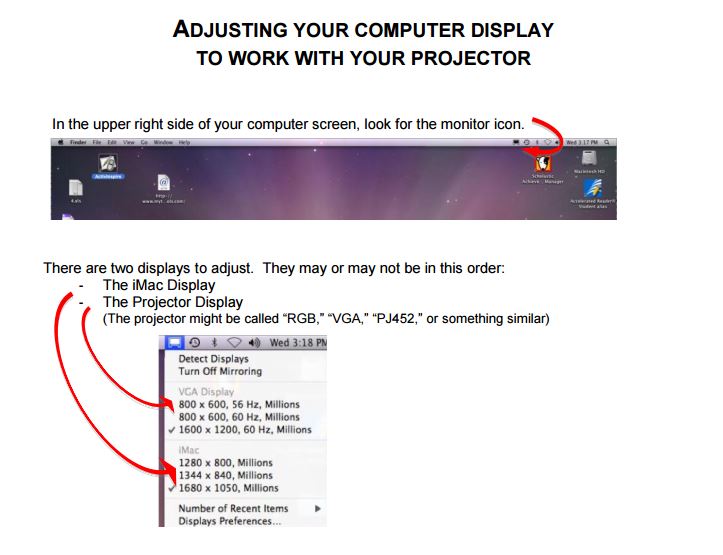
It is horribly frustrating to prepare a great presentation and then be unable to use the images you planned for your audience. The PDF below assumes that you have already connected your projector (or other external monitor) to your Mac. These instructions can be used with either desktops or laptops connected to compatible external (or additional) monitors. Make sure your additional display is properly connected and powered on before beginning.

Adjusting Mac Display to Work with Projector

No monitor icon?
If there is no monitor icon in your menu bar, you can find the same settings by beginning here:

From the Apple menu, choose System Preferences.

From the View menu, choose Displays.

Continue with the PDF instructions

Additional Display Info:

Toggle between mirrored & extended desktop:  Cmd + F1

Detect displays:  Cmd + F2

  • Press Command-F1 to toggle between video mirroring and extended desktop
  • Press Command-F2 to detect displays

.

Share

Leave a Reply Cancel reply

Your email address will not be published. Required fields are marked *

Search TardySlip

About TardySlip

THE SITE
TardySlip is a personal site – not a business - and is updated as the bloggers’ commitments allow.

REQUESTS
Are there materials you can't find anywhere? Let me know in the comments, & I'll try to add them!

COMMENTS
We enjoy comments & reply when possible. But, if you have a special time constraint that requires posting quickly, you're in the wrong place. (It’s called “TardySlip” for a reason.)

Comments are not auto-approved. (We ignore trolls, F-bombers, name-callers, & other meanies.)

We do not claim intellectual property rights over your comments, but may republish them in other formats.

NAVIGATION
New posts are in the “Home” tab.
Post categories are in this sidebar.

Recent Posts

  • Adjusting Your Mac’s Display to Project
  • COMPTIA A+ CERTIFICATION LINKS
  • Administrative Distances Flashcards
  • Ethernet Cable Length & Speed Flashcards
  • Ethernet Cable Length & Speed Chart
  • CIDR Subnetting Chart
  • CompTIA A+ 802 Acronyms
  • VLANs Flashcards
  • Networking Terms Flashcards
  • EIGRP Flashcards

Topic Pages

Blogroll

  • Documentation
  • Plugins
  • Suggest Ideas
  • Support Forum
  • Themes

Still Kickin

September 2015
M T W T F S S
 123456
78910111213
14151617181920
21222324252627
282930  
« Feb    

Admin

  • Log in
  • Entries feed
  • Comments feed
  • WordPress.org
©2026 TardySlip | Design: Newspaperly WordPress Theme
